08 August 2023
The Benefits of 3D Walkthroughs for Architects and Clients
Architects face a fundamental communication challenge: translating two-dimensional drawings into three-dimensional understanding. Clients struggle to interpret floor plans and elevations, leading to misaligned expectations, costly revisions, and approval delays. 3D walkthroughs solve this problem by creating immersive previews that allow clients to experience spaces before construction begins.
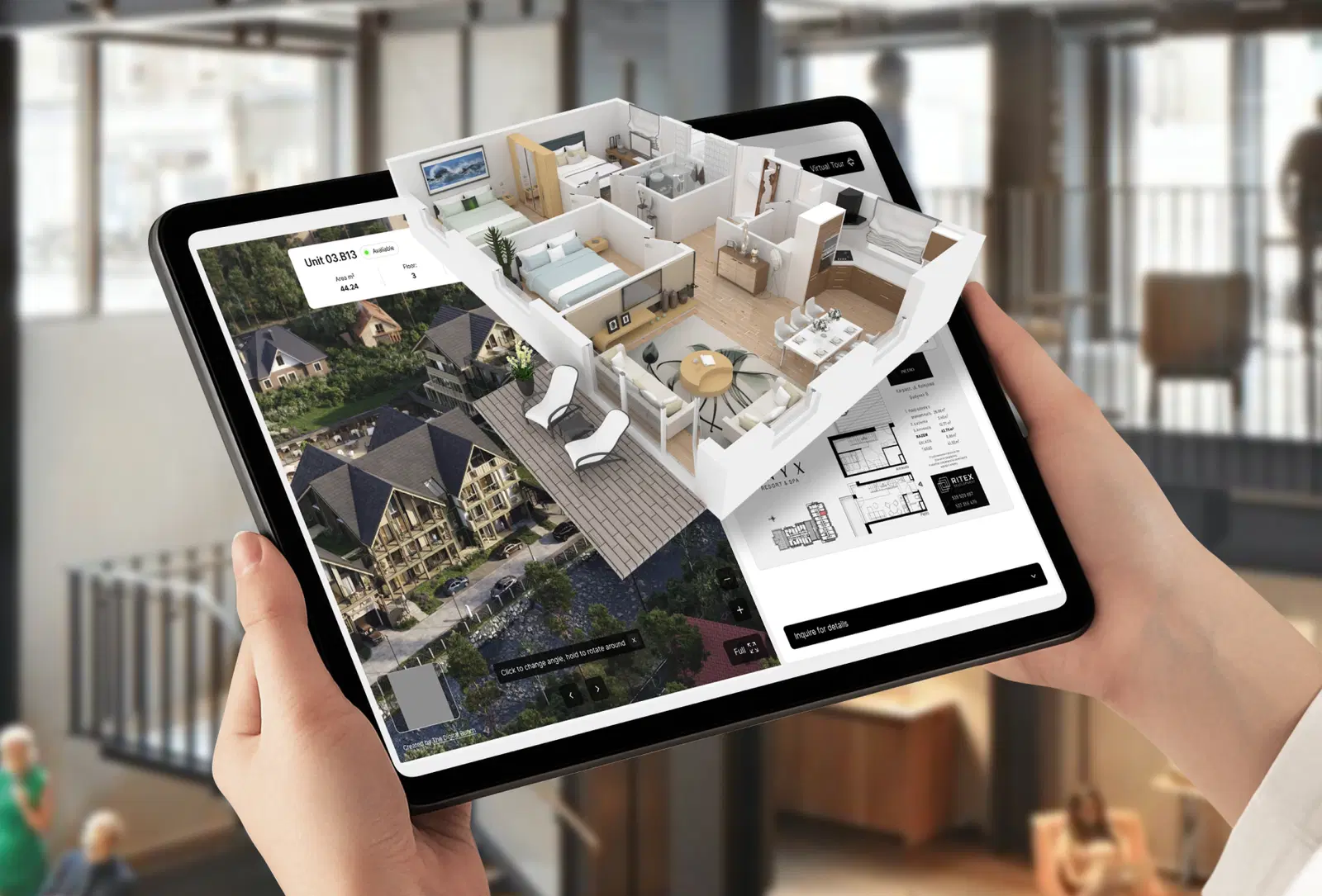
Architects face a fundamental communication challenge: translating two-dimensional drawings into three-dimensional understanding. Clients struggle to interpret floor plans and elevations, leading to misaligned expectations, costly revisions, and approval delays. 3D walkthroughs solve this problem by creating immersive previews that allow clients to experience spaces before construction begins.
What Exactly Are 3D Walkthroughs and How Do They Work?
3D walkthroughs allow architects to create virtual tours of buildings or spaces before they exist physically. These walkthroughs use advanced rendering software to produce incredibly lifelike experiences. They can showcase both interior and exterior spaces and include features such as lighting, furniture, and landscaping.
With 3D walkthroughs, architects give clients the ability to understand how spaces are divided, comprehend layouts, and visualize how various design elements will be incorporated into the building. The ability to see designs from all angles and perspectives allows clients to fully grasp the architect's vision and make informed decisions about the project.
What Makes 3D Walkthroughs Different from Traditional Renderings?
Traditional architectural renderings show specific viewpoints chosen by the architect. They are beautiful but static. A 3D walkthrough is fundamentally different because it gives viewers control. They can move through spaces at their own pace, look up at ceilings, examine details, and develop their own understanding of spatial relationships.
This interactivity matters because people process spatial information differently. Some clients immediately understand floor plans. Others need to experience spaces virtually to comprehend them. 3D walkthroughs accommodate both types of understanding.
The technology has advanced to the point where lighting behaves realistically, materials have accurate textures, and spaces feel genuinely dimensional. This realism bridges the gap between imagination and reality in ways that drawings and static images cannot achieve.
How Do 3D Walkthroughs Improve Visualization and Client Understanding?
The most immediate benefit of 3D walkthroughs is improved visualization. Architects spend years training to read and interpret technical drawings. Clients typically have no such training. This creates a fundamental communication barrier that 3D walkthroughs eliminate.
Why Do Clients Struggle with Traditional Architectural Drawings?
Traditional architectural presentations require clients to perform mental translation. They must look at a floor plan and imagine the three-dimensional space. They must see an elevation and understand how it relates to the interior layout. They must interpret section cuts and understand ceiling heights and spatial volumes.
Most clients cannot do this reliably. They nod along during presentations but leave with incomplete understanding. Only when construction is underway do they realize that the space does not match what they imagined. By then, changes are expensive or impossible.
With a 3D walkthrough, clients can get a better sense of scale, proportion, and spatial relationships. They can see how their space will look and feel before it is built, which helps them make informed decisions and provide valuable feedback.
How Does Better Visualization Affect Project Outcomes?
When clients truly understand what they are approving, several things happen. They provide more useful feedback during the design phase. They feel confident in their decisions rather than anxious about unknowns. They develop realistic expectations about the finished space. Most importantly, they do not request major changes during construction.
This alignment between architect vision and client understanding represents the core value of architectural visualization. The technology exists to serve communication, not just to create beautiful images.
How Do 3D Walkthroughs Reduce Errors and Costly Revisions?
By creating a 3D model of a building or space, architects can assess designs and make changes virtually before construction begins. This helps identify potential problems or design flaws early, reducing the need for expensive and time-consuming revisions during construction.
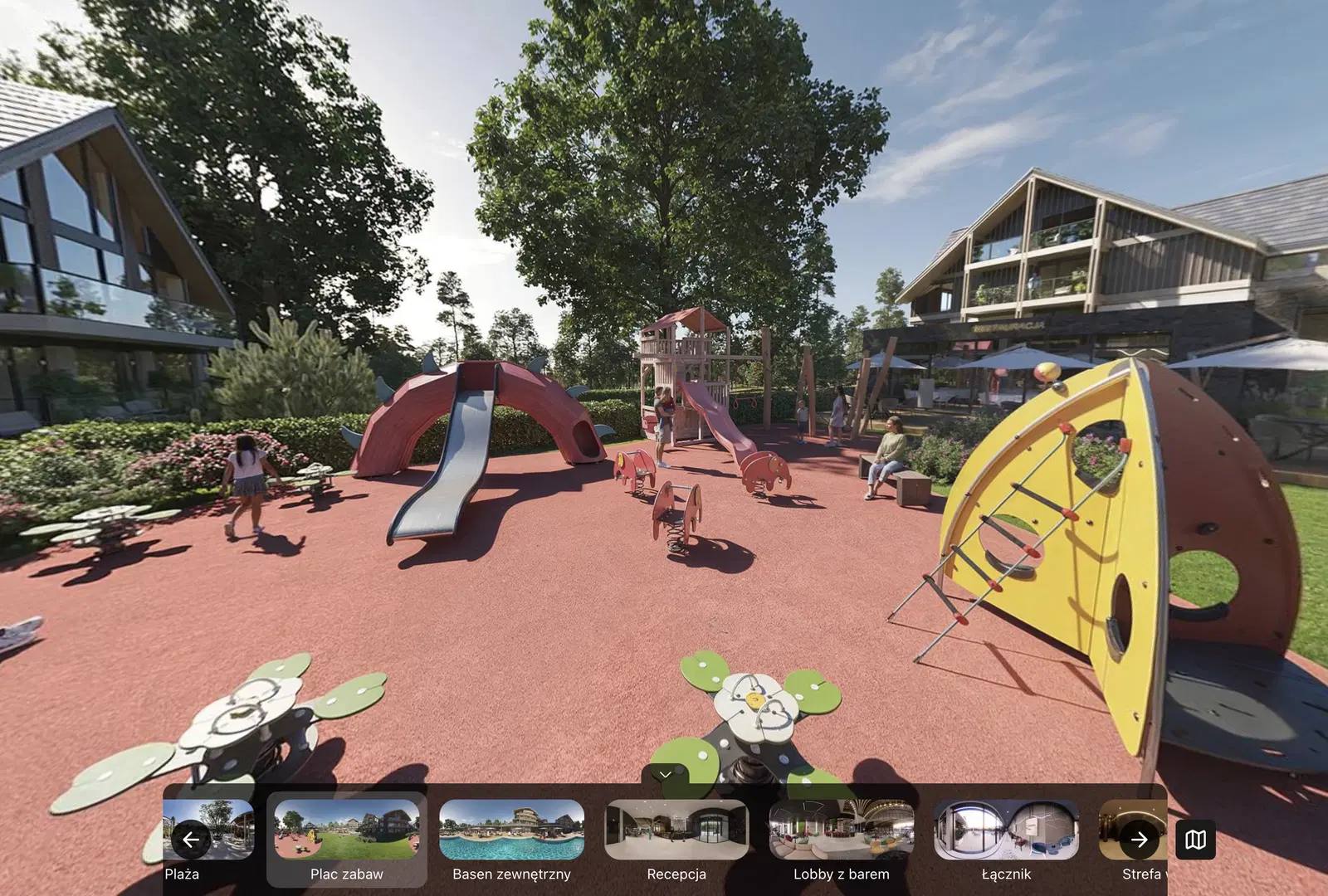
What Design Issues Can You Catch Before Construction Starts?
An architect can use a 3D walkthrough to assess whether window placement will allow sufficient natural light. They can identify spatial issues that need addressing. They can test whether door swings create conflicts. They can verify that ceiling heights feel appropriate in different rooms.
These assessments happen in the virtual environment where changes cost nothing. Moving a window in a 3D model takes minutes. Moving a window during construction takes days and significant expense. The earlier you catch issues, the cheaper they are to fix.
3D walkthroughs also allow architects to test interior design concepts and assess whether elements and decorations work well together. They can experiment with different colors, materials, and lighting to see how they affect the overall design of the building.
How Does Virtual Testing Prevent Construction Problems?
Construction problems typically fall into two categories: technical errors and aesthetic mismatches. Technical errors include things like inadequate clearances, conflicting building systems, or structural impossibilities. Aesthetic mismatches occur when materials, colors, or proportions do not work together as intended.
3D walkthroughs catch both types of problems. The technical modeling process forces architects to work through spatial conflicts. The visual output reveals aesthetic issues that might not be apparent in drawings. By the time the project reaches construction, most problems have been identified and resolved.
This preventive approach fundamentally changes project economics. Traditional architecture accepts that some percentage of projects will require changes during construction. With thorough 3D modeling and walkthroughs, that percentage drops significantly.
What Cost and Time Savings Do 3D Walkthroughs Generate?
Using 3D walkthroughs can ultimately lead to significant cost and time savings for architects and their clients. By allowing virtual testing of design concepts and identifying potential errors before construction begins, 3D walkthroughs help reduce expensive and time-consuming revisions during construction.
How Do Faster Approvals Reduce Project Timelines?
When clients clearly understand what they are approving, they make decisions faster. They do not need to request additional drawings or schedule extra meetings to clarify their questions. They can see the design, walk through it virtually, and either approve it or request specific changes.
This decisiveness accelerates timelines significantly. Projects that might require three or four rounds of revisions with traditional presentations often require only one or two with 3D walkthroughs. Each eliminated revision cycle saves weeks from the overall schedule.
Additionally, 3D walkthroughs can lead to faster approvals from contractors and regulatory bodies. Contractors can better estimate costs and identify construction challenges when they can see the space virtually. Regulatory reviewers can assess compliance more thoroughly when they understand spatial relationships clearly.
What Hidden Costs Do 3D Walkthroughs Eliminate?
Beyond obvious savings from reduced revisions, 3D walkthroughs eliminate hidden costs that plague traditional projects. They reduce the time architects spend explaining designs repeatedly. They minimize the risk of disappointed clients who expected something different. They prevent the erosion of client relationships that occurs when projects do not meet expectations.
These soft costs are difficult to quantify but substantial. A single dissatisfied client can damage an architect's reputation and eliminate future referrals. A project that requires extensive rework damages profitability and team morale. 3D walkthroughs prevent these scenarios by ensuring alignment before commitments are made.
How Do 3D Walkthroughs Improve Website Engagement and Lead Generation?
Virtual tours can keep people on a website for five to ten times longer than traditional static images or text. This increased engagement not only provides a more immersive experience for users but also allows them to interact with the space and develop better understanding of the design.
Why Does Longer Website Engagement Matter for Architects?
When potential clients spend more time engaging with your work, several positive outcomes follow. They remember your projects better. They develop stronger impressions of your capabilities. They feel more connected to your design approach. Most importantly, they are more likely to contact you about their own projects.
From a marketing perspective, this engagement translates directly to lead quality. Someone who has spent ten minutes exploring your 3D walkthroughs arrives at an initial consultation already familiar with your work and style. They have self-qualified by investing time in understanding your approach.
Additionally, longer website visits improve search engine optimization and overall website performance. Search engines interpret extended engagement as a signal that your content provides value. This can improve rankings and drive more organic traffic to your site.
How Do 3D Walkthroughs Support Content Marketing Strategy?
3D walkthroughs create shareable content that performs well across digital marketing channels. They can be embedded in project case studies, shared on social media, included in email campaigns, and featured in portfolio presentations.
This versatility means you create the walkthrough once and use it repeatedly across different contexts. The same 3D model that helps clients approve the design becomes a marketing asset that attracts new clients. This dual-purpose value makes the investment in quality visualization particularly worthwhile.
How Do 3D Walkthroughs Strengthen Branding and Marketing?
3D walkthroughs represent an excellent option for branding and marketing. By creating immersive virtual experiences of properties, architects can showcase their capabilities in unique ways that set them apart from competitors.
What Makes 3D Walkthroughs Effective Marketing Tools?
Traditional architectural marketing relies heavily on finished photography. This creates a timing problem. You cannot market a project until it is built and photographed, which means months or years pass between design completion and marketing use.
3D walkthroughs eliminate this delay. You can market projects while they are under construction or even before construction begins. This allows you to maintain consistent marketing output regardless of construction timelines.
These walkthroughs can be shared on social media, websites, and other marketing materials to increase brand visibility and engagement. They demonstrate technical sophistication and attention to detail. They show that you invest in tools and processes that benefit clients. All of these factors strengthen your brand positioning.
How Do 3D Walkthroughs Differentiate Your Practice?
In competitive architectural markets, differentiation matters. Many architects produce beautiful drawings and renderings. Fewer invest in comprehensive 3D walkthroughs that truly immerse clients in proposed designs.
By making 3D walkthroughs a standard part of your process, you signal that you prioritize client understanding and communication. This commitment attracts clients who value clarity and collaboration. It positions you as forward-thinking and client-focused rather than traditional and architect-centric.
How Do 3D Walkthroughs Improve Cost and Material Estimation?
3D walkthroughs can provide greater accuracy in estimating costs and material quantities for construction projects. With a complete 3D model, architects and builders can easily calculate the amount of materials needed, such as lumber, flooring, and tiles.
Why Are Material Estimates More Accurate with 3D Models?
Traditional estimation methods rely on calculating areas and volumes from two-dimensional drawings. This process is prone to errors because it requires manual interpretation and calculation. Complex geometries are particularly difficult to estimate accurately using conventional methods.
A 3D model contains precise geometric information that can be automatically calculated. Surface areas, volumes, and quantities can be extracted directly from the model with minimal error. This accuracy prevents costly mistakes in material ordering and reduces waste.
How Does Accurate Estimation Affect Project Budgets?
Accurate cost estimates help project managers stay within budget and prevent unexpected expenses. When material quantities are calculated precisely, you avoid both under-ordering and over-ordering. Under-ordering causes project delays while you wait for additional materials. Over-ordering ties up capital in excess inventory.
Beyond materials, accurate 3D models improve labor estimates. Contractors can assess the actual complexity of construction tasks when they can see complete three-dimensional representations. This leads to more realistic bids and fewer change orders during construction.
For clients, this accuracy provides confidence that budgets are realistic and achievable. Nothing damages client relationships more than budget overruns caused by poor planning. 3D visualization helps prevent this scenario.
When Should You Use 3D Walkthroughs in Your Projects?
3D walkthroughs can be beneficial in many situations, especially when there is a need to present designs in detailed and interactive ways. Understanding when to invest in walkthroughs helps you allocate resources effectively.
What Project Types Benefit Most from 3D Walkthroughs?
Complex residential projects with custom layouts benefit significantly from 3D walkthroughs. When clients are investing substantial sums in custom homes, they need confidence that every detail matches their vision. Walkthroughs provide this confidence.
Commercial and hospitality projects also benefit strongly. These projects often involve multiple stakeholders including owners, operators, investors, and regulatory bodies. 3D walkthroughs give everyone a common reference point for discussions and decisions.
Real estate development projects use 3D walkthroughs for pre-sales and investor presentations. Being able to show potential buyers or investors exactly what will be built generates commitment and funding before construction begins.
When in the Design Process Should You Create Walkthroughs?
The optimal timing depends on your workflow and project complexity. Some architects create rough walkthroughs during schematic design to test spatial concepts. Others wait until design development when details are more resolved.
Generally, walkthroughs provide maximum value when designs are sufficiently developed that the walkthrough represents what will actually be built, but early enough that changes can still be incorporated without major disruption. This typically occurs during the later stages of design development or early in construction documentation.
Creating walkthroughs too early means redoing work as designs evolve. Creating them too late means missing opportunities to catch issues before they become expensive problems. Finding the right timing for your practice requires balancing these factors.
What Are the Biggest Challenges in Creating Quality 3D Walkthroughs?
One of the biggest challenges is ensuring the accuracy and realism of the final product. This involves paying close attention to every detail, including lighting, textures, and dimensions, and making sure that everything is true to life.
Why Does Realism Matter So Much in Architectural Walkthroughs?
If a 3D walkthrough does not look realistic, it fails in its primary purpose. Clients will not trust it as a representation of what will be built. They will still feel uncertain about their decisions. The entire investment in creating the walkthrough provides little value.
Achieving realism requires expertise across multiple domains. Lighting must behave as it does in real spaces, with accurate shadows, reflections, and indirect illumination. Materials must have correct colors, textures, and physical properties. Proportions must match exactly what the architectural drawings specify.
As Krzysztof Woleński, 3D Graphic Designer at The Digital Bunch, explains: "A big challenge is the time and effort required to create a 3D walkthrough. It is a complex process that involves modeling, texturing, rendering, and post-processing, and each stage requires careful attention to detail."
How Do You Balance Quality with Project Timelines and Budgets?
Creating photorealistic 3D walkthroughs takes time. The modeling process is meticulous. Texturing requires sourcing or creating accurate material representations. Rendering can take hours or days depending on complexity and desired quality. Post-processing polishes the final output.
This time investment must be balanced against project schedules and budgets. Not every project justifies the same level of detail. A residential renovation might need a simpler walkthrough than a luxury commercial development. Understanding where to invest effort requires experience and judgment.
The challenge extends to usability. Walkthroughs must be user-friendly and easy to navigate. This involves designing interfaces that are intuitive and informative, providing users with clear instructions, and ensuring compatibility with different devices and platforms. Technical sophistication means nothing if clients cannot actually use the walkthrough.
How Do You Choose the Right Partner for Your 3D Walkthroughs?
It is important to choose the right 3D studio for the job. Look for a studio with experience in architectural visualization and 3D rendering, and make sure they have a strong portfolio of previous work that demonstrates their capabilities and attention to detail.
What Should You Look For in a Visualization Partner's Portfolio?
Examine the realism of their work. Do materials look convincing? Does lighting feel natural? Do spaces have the right proportions and feel? Technical skill should be evident in every image.
Look for variety in their portfolio. Have they worked on different project types? Can they handle both interiors and exteriors? Do they show versatility in style and approach? Flexibility suggests they can adapt to your specific needs rather than forcing every project into the same template.
Pay attention to their understanding of architecture. Do their visualizations show proper construction details? Are proportions correct? Do they understand how buildings actually work? The best visualization partners have deep knowledge of architecture, not just 3D software.
Why Do Communication and Collaboration Matter in Visualization Projects?
Technical skill alone does not guarantee successful outcomes. The visualization partner must understand your vision and translate it accurately into 3D form. This requires clear communication and genuine collaboration throughout the process.
A good 3D studio will work with you to understand your vision and ensure that the final product meets your expectations. They will ask clarifying questions. They will present work-in-progress for your feedback. They will make revisions based on your input. They will treat the process as a partnership rather than a transaction.
Do not hesitate to ask for references or reach out to previous clients to get an idea of the studio's reputation and customer service. Past clients can tell you whether the studio meets deadlines, responds to feedback constructively, and delivers quality that matches promises.
What Should You Consider When Getting Started with 3D Walkthroughs?
If you are looking to leverage the benefits of 3D walkthroughs for your architectural practice, several considerations will help ensure successful implementation. The technology offers clear advantages, but maximizing those advantages requires thoughtful approach and the right partnerships.
How Should You Integrate 3D Walkthroughs into Your Design Process?
Start by identifying which projects will benefit most from walkthroughs. Not every project requires the same level of visualization investment. Focus initially on projects where client communication challenges are greatest or where design complexity is highest.
Establish clear workflows for how walkthroughs fit into your design phases. When will you create them? What level of detail is required at each stage? How will you incorporate client feedback from walkthrough reviews? These process questions matter as much as technical capabilities.
Consider how walkthroughs will be presented to clients. Will they be interactive files clients can explore independently? Will they be guided tours narrated by your team? Will they be embedded in websites or sent as standalone files? The presentation method affects how you structure the walkthroughs themselves.
What Should You Expect from a Professional Visualization Partnership?
Working with experienced studios like Digital Bunch means accessing not just technical skills but accumulated knowledge about what works in architectural visualization. We understand how to create walkthroughs that communicate clearly, how to balance quality with timeline constraints, and how to translate architectural intent into compelling virtual experiences.
The content production process should feel collaborative rather than transactional. You should receive regular updates and have opportunities to provide feedback throughout development. The final product should reflect both technical excellence and deep understanding of your design vision.
When you are ready to explore how 3D walkthroughs can transform your practice, partnering with a team that combines technical expertise with architectural understanding makes all the difference. Quality visualization requires both skillsets working together.
Keep reading

Marketing
Business
1/10
Which Digital Investments Actually Hold Value During Budget Pressure: Website, Brand, or Content?
03 October 2023
Marketing
Business
Which Digital Investments Actually Hold Value During Budget Pressure: Website, Brand, or Content?
03 October 2023
Marketing
2/10
How Does Consumer Research Behavior Change Website Lead Generation Strategy?
11 February 2025
Marketing
How Does Consumer Research Behavior Change Website Lead Generation Strategy?
11 February 2025

CGI
3/10
The Importance of Lighting in Architectural Visualization
13 July 2023
CGI
The Importance of Lighting in Architectural Visualization
13 July 2023

Marketing
4/10
10 Critical Success Factors Every Startup Founder Must Master to Avoid Failure
10 December 2024
Marketing
10 Critical Success Factors Every Startup Founder Must Master to Avoid Failure
10 December 2024
Marketing
Design
5/10
UX/UI Design Trends for 2026: What's Worth Your Investment (And What's Just Hype)
13 January 2026
Marketing
Design
UX/UI Design Trends for 2026: What's Worth Your Investment (And What's Just Hype)
13 January 2026
Marketing
6/10
Creating an Interactive Buying Experience: The Power of 3D Product Configurators
13 August 2023
Marketing
Creating an Interactive Buying Experience: The Power of 3D Product Configurators
13 August 2023

Marketing
7/10
The Benefits of 360-Degree Product Views for Online Shopping
08 August 2023
Marketing
The Benefits of 360-Degree Product Views for Online Shopping
08 August 2023

CGI
8/10
Should You Choose 3D Product Renders or Professional Photography for Your Brand?
16 February 2026
CGI
Should You Choose 3D Product Renders or Professional Photography for Your Brand?
16 February 2026

Marketing
9/10
How Does 3D Product Animation Transform Social Media Marketing Performance?
10 January 2024
Marketing
How Does 3D Product Animation Transform Social Media Marketing Performance?
10 January 2024

Business
Marketing
10/10
Architectural Visualization Saudi Arabia: What International Developers Must Know
17 February 2026
Business
Marketing
Architectural Visualization Saudi Arabia: What International Developers Must Know
17 February 2026
1/10